Bookkeeping
Spread a payment over the months it pays for
Spread a year paid up front over the months it covers, accrue a cost in the month you used it, and pause, resume or delete a schedule.
Some money belongs to more than one month. A year of Vanta paid in March is not a March expense: it is a twelfth of the cost in each month from March to February. An annual contract a customer paid by wire in March is not March revenue either: it is earned a twelfth a month. Booked in full on the day the money moved, both make one month look terrible and eleven look too good.
A schedule fixes that. You spread the transaction over the months it pays for, and each month's close takes that month's share into the P&L. The rest waits on the balance sheet.
Money you paid
Money you received
Try it below. Switch between All in one month and Spread over 12 months, and move through the year to see what each month's P&L takes and what waits on the balance sheet.
See the difference
You pay $12,000.00 in March for a year of software.
- March in the P&L
- $12,000.00
- In the P&L so far
- $12,000.00
- Waiting in Prepaid expenses
- $0.00
March looks $11,000.00 worse than it was, and the next 11 months look better than they were.
When to spread a payment
Spread money that pays for, or is earned over, more than one month:
- A year of software paid in one go: Vanta, Notion, a cloud commitment.
- Insurance: a D&O or general liability policy that covers the next 12 months.
- Annual customer contracts a customer paid up front by wire. You earn them a month at a time.
Do not spread monthly subscriptions or one-off purchases. They already land in the month they belong to. If you are not sure, ask whether the payment would still be doing something for you in three months: if it would, spread it.
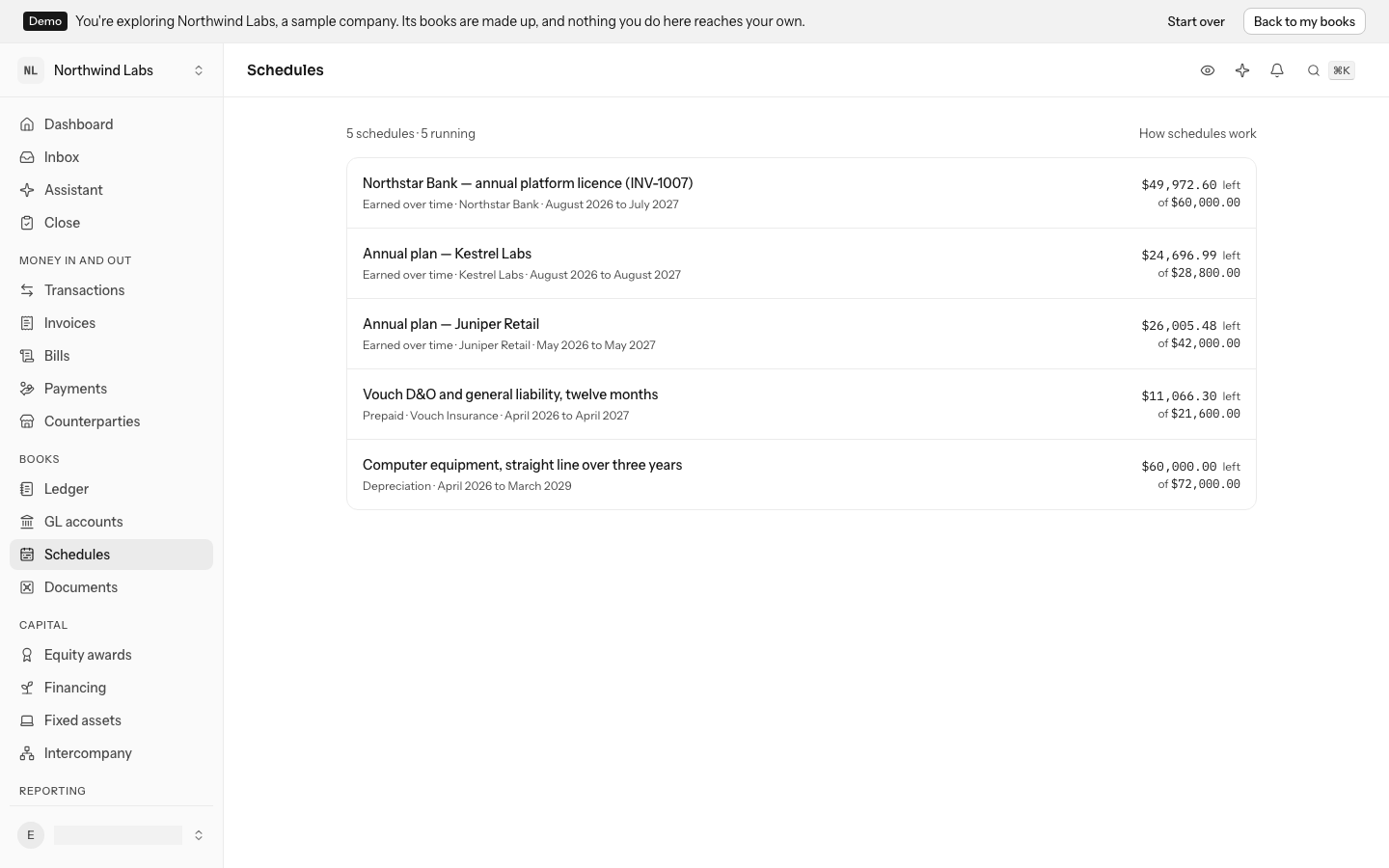
The Schedules screen lists every schedule in your books, including the ones Stripe keeps for annual plans and the depreciation of equipment.
Spread a transaction over months
- Open the transaction. It must be in the books, filed under one GL account.
- Open the ⋯ menu and select Spread over months, or press O.
- Pick the First month it pays for. It starts on the transaction's month.
- Enter how many Months it covers: 12 for a year. The line under the fields says what each month will take, for example $1,000.00 a month, March 2026 to February 2027.
- Select Spread.
Nothing posts yet. The transaction stays filed where it was, so a year of Vanta is still 6210 Software and subscriptions. Its page now has a Spread over months section that says how many months are in the books and opens the schedule.
You can spread money paid out (an expense) or money received (income). Transfers, fees, refunds and split transactions cannot be spread.
You can also start from Schedules: select Spread a transaction, search for the payment, for example Vanta, and select it. The list shows only transactions that can be spread. Then pick its First month and Months as above.
What happens at each close
When you close a month, LedgerIt posts one entry per schedule before it checks anything else. For a payment, it moves the part not used yet out of the expense and into 1300 Prepaid expenses, and lets each month's share back in. For money received, it does the same with revenue and 2400 Deferred revenue.
$1,000.00 a month, March 2026 to February 2027
The March 2026 close
One entry, marked as coming from the schedule.
| Account | Debit | Credit |
|---|---|---|
| 1300Prepaid expenses | $11,000.00 | |
| 6210Software and subscriptions | $11,000.00 | |
| Balances | $11,000.00 | $11,000.00 |
- In the P&L, 6210
- $1,000.00
- Waits in 1300
- $11,000.00
The first close moves what is not used yet out of Software and subscriptions and into Prepaid expenses. Pick a later month.
In March, a $12,000 year of software shows $1,000 of software expense and $11,000 of prepaid expenses. Each month's share is worked out from the running total, so a total that does not divide evenly never leaves a cent behind.
Each close's entry is in the Ledger, marked as coming from a schedule, and linked from the schedule's page. When the transaction names a department, both of the entry's lines name it too, so the department's spend in Spend by department is its monthly share. If an account the close posts to requires a department the transaction does not name, spreading it is refused until it does: name its department first.
If you spread a transaction after its month is closed, the closed months stay exactly as they were reported. The next close catches up in one entry: spread a March payment in April, and April's close takes in the March and April shares together.
Read a schedule
Open Schedules in the sidebar, or press G then O. Running schedules come first, then paused ones, then finished ones. Each row shows what the schedule is for, its kind (Prepaid, Earned over time or Depreciation), who it is with, its months, and how much is left of the total.
A schedule's page shows:
- the GL account each month's share Reaches the P&L in, and the account the rest Waits in;
- the transaction it was Spread from;
- Month by month: each month with its share. A month a close has taken in says In the books and opens that close's entry; one caught up later says which close took it in, for example Taken in at the April 2026 close. A month no close has taken in yet says To come.
- its History: who spread it and who changed it.
Change a schedule's months
To change what a schedule is for, click its description at the top of its page, type the new one and press Enter.
The months change the same way, at the top of its page: click the first month to pick another, or the number of months to type a new one. How it is Shared out, the same share each month or by the days in each month, is picked under Where it goes.
What a close already posted stays posted. The next close posts the difference between the new months and what is in the books. To stop a schedule early, for example when you cancel a contract, shorten it to end this month: the next close takes in everything that is left.
Pause and resume a schedule
Pause a schedule when you need the closes to stop posting from it for a while, for example while a customer's contract is on hold or a policy is in dispute. Select Pause in the ⋯ menu on its row in Schedules, or on its page. The schedule shows Paused, and:
- what the closes already posted stays in the books;
- no close posts from it while it is paused, so nothing more moves into the P&L.
Select Resume in the same menu to let it run again. Its months have not changed, so the next close catches up every month it was paused in one entry: pause a $12,000 year of software after March's close, resume it in May, and May's close takes in April's and May's shares together.
If the months it paused should come later instead, for example because the service itself was suspended, change its months after resuming it.
You can pause any running schedule you made: a spread transaction or an accrual. A finished or cancelled schedule has nothing left to pause, and Stripe's and depreciation schedules follow their invoice and their asset.
Delete a schedule
Until a close has posted from a schedule, you can delete it with Delete schedule in the ⋯ menu on its row in Schedules or on its page. The transaction then counts in full in its own month again.
Once a close has posted from it, a schedule stays, because its entries are part of the books. Change its months instead.
Why a spread transaction cannot be refiled
A schedule takes each month's share out of the GL account its transaction is filed to. If the transaction were filed somewhere else, the money would count in full in the new account and be taken out of the old one. So while a schedule exists, LedgerIt refuses to refile, split, exclude or reverse its transaction, or change its department. Delete the schedule first, if no close has used it.
Accrue a cost before it is paid
The opposite problem: a cost you used this month that is billed or paid next month. September's AWS is charged on October 3. Booked when it is paid, September looks cheaper than it was and October more expensive. An accrual books it in September.
- Open Schedules and select New accrual.
- Say What it is, for example AWS for September, and enter an Estimate. Last month's bill is usually a good one.
- Pick the Month used. It starts on last month, the one you are closing.
- Pick the Expense account the cost belongs to, for example 5010 Hosting and infrastructure.
- Pick the Vendor who will bill it, if you know who. This is optional, and it is what lets LedgerIt release the accrual for you.
- If your books have departments, pick the Department the cost belongs to. Both the month's cost and the release that takes it back out carry it, so Spend by department counts it in the right place. If the expense account requires a department, you have to pick one.
- Select Accrue.
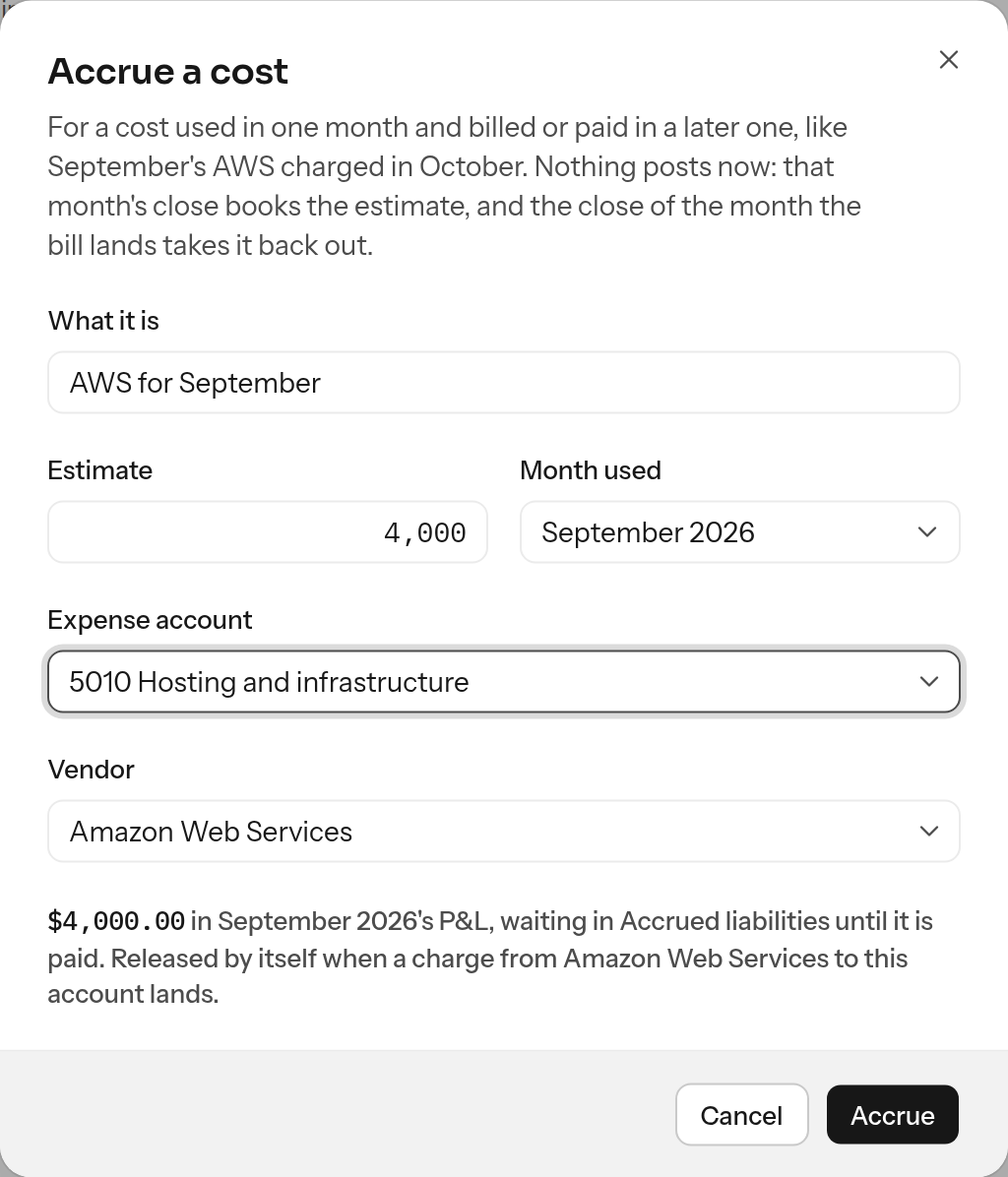
Nothing posts yet. When you close the month used, the close debits the expense and credits 2200 Accrued liabilities with the estimate, so the month carries the cost.
When the bill lands, the accrual is released. With a vendor, LedgerIt does it: at the close of the month in which a charge from that vendor, filed to the same account, lands after the month used, it takes the estimate back out of the expense. That month then carries only the difference between the bill and the estimate. A $4,210 bill against a $4,000 estimate leaves $210 in October. A bill paid a month late leaves the accrual owed until it lands.
September
The September close accrues the estimate
| Account | Debit | Credit |
|---|---|---|
| 5010Hosting and infrastructure | $4,000.00 | |
| 2200Accrued liabilities | $4,000.00 | |
| Balances | $4,000.00 | $4,000.00 |
- Hosting in the P&L, 5010
- $4,000.00
- Owed, 2200
- $4,000.00
October
October 3: the AWS charge, filed to Hosting
| Account | Debit | Credit |
|---|---|---|
| 5010Hosting and infrastructure | $4,210.00 | |
| 1000Cash and cash equivalents | $4,210.00 | |
| Balances | $4,210.00 | $4,210.00 |
The October close takes the estimate back out
| Account | Debit | Credit |
|---|---|---|
| 2200Accrued liabilities | $4,000.00 | |
| 5010Hosting and infrastructure | $4,000.00 | |
| Balances | $4,000.00 | $4,000.00 |
- Hosting in the P&L, 5010
- $210.00
- Owed, 2200
- $0.00
Each month's accrual is its own. If AWS bills you every month for the month before, accrue each month at its close: September's accrual takes October's charge, and October's takes November's.
You often need not make one by hand. When a vendor that bills every month has not billed this one by its usual day, the daily books check raises it in the Inbox, and Accrue there makes the accrual with the vendor, the account its charges go to and its usual amount. That accrual stands in for this month's charge, so a charge that arrives later in the same month releases it in that month (see Work the inbox).
Payroll is accrued for you too. When a month ends with days no payroll run paid, the Inbox asks once, and Accrue makes an accrual for each account the runs post to, released on the next month's first day, when the run that pays those days lands (see Work the inbox).
On the accrual's page:
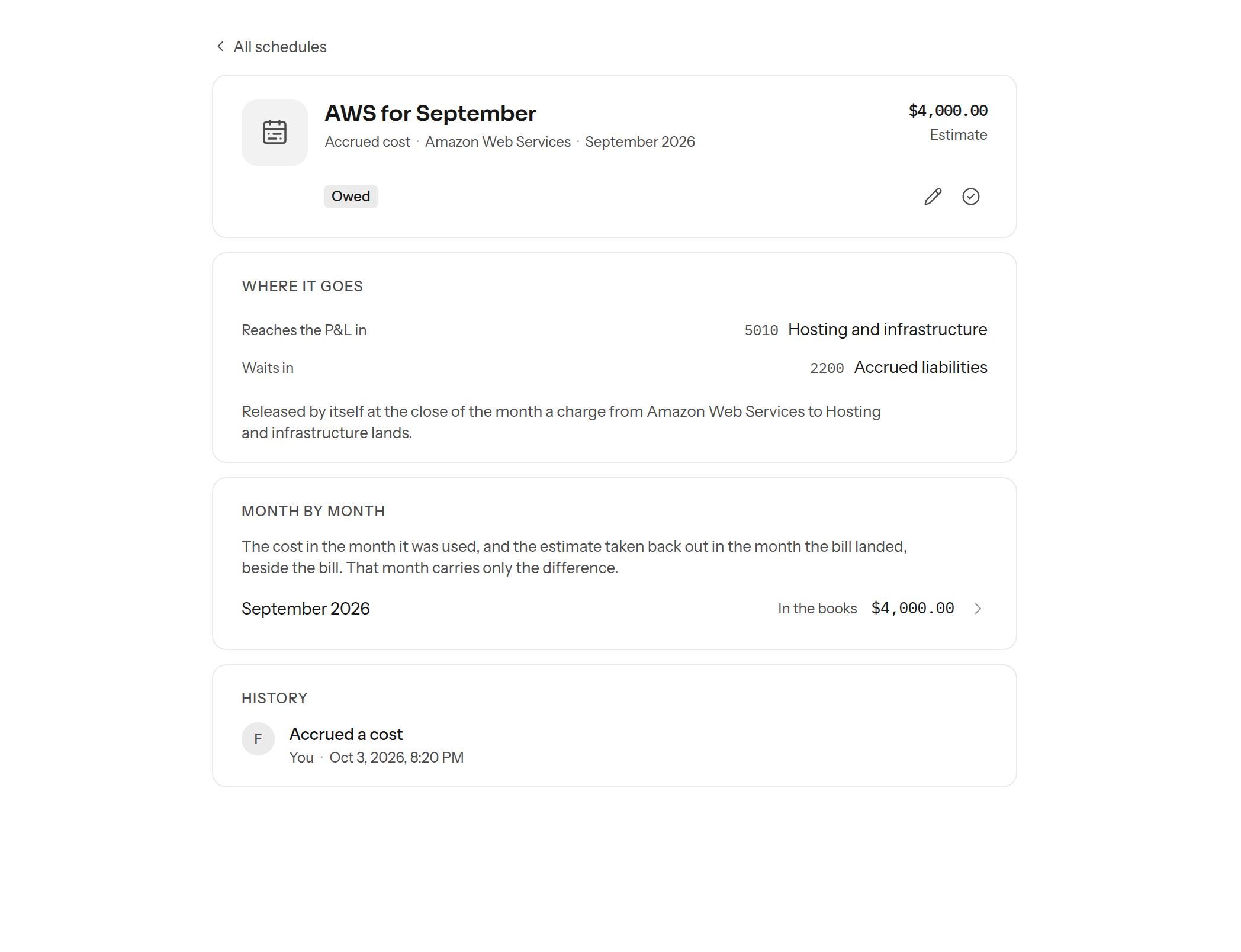
- Estimate: click the amount, type the new one and press Enter. It changes until it is released. If its month is already closed, the next close posts the difference.
- Mark as paid (the check) releases an accrual no charge will release: one with no vendor, a bill paid from somewhere LedgerIt does not see, or a cost that turned out not to be owed. Pick the day it was paid; that month's close takes the estimate back out.
- Department changes which department the cost belongs to until its month's close has posted it. After that it stays, so the cost and its release land on the same department.
- Month by month shows the month the cost was booked and the month it was taken back out, each with its close's entry. Settled by opens the charge that released it.
You cannot accrue into a month that is already closed: its close has happened. Reopen the month, or let the cost land where it is paid.
Schedules you do not make
- Stripe keeps a schedule for each invoice that covers more than one month, such as an annual plan. It follows the invoice, so you can read it here but not change it.
- Depreciation of equipment is a schedule too, when your books have one.
Who can do what
Anyone with access to the books can read schedules. Spreading a transaction, accruing a cost, changing a schedule's description, months or an accrual's estimate, marking an accrual paid, pausing, resuming and deleting a schedule take the owner, admin or accountant role.
Related guides
- Find and file the transactions to spread: Transactions.
- The close that posts each month's share: Close the month.
Do this through the API
Everything in this guide is also an API call, for scripts and agents. The reference lists each operation with its parameters and objects.