Close and reports
Send the board pack
Every closed month's statements, cash, burn, runway and MRR in one pack, with your highlights, challenges and asks, ready to export as a PDF for the board.
A board pack is what a month's close hands your board: the balance sheet, the income statement and the cash flow statement for the month, the figures a board asks about first (cash, burn, runway, MRR), and what you have to say about them. Closing a month makes its pack. Its figures are the ones the close signed off, so a pack reads the same in December as it did when you sent it in October, whatever was posted since.
Everyone with access to the books can open and export a board pack, viewers included. Owners, admins and accountants can write its commentary.
Find a month's pack
Board packs, under the statements on the Reports screen, lists every pack, the newest month first. You can also open a month's pack from its close: once the month is closed, Open the board pack sits beside Reports kept at close. See Close the month.
Read the figures
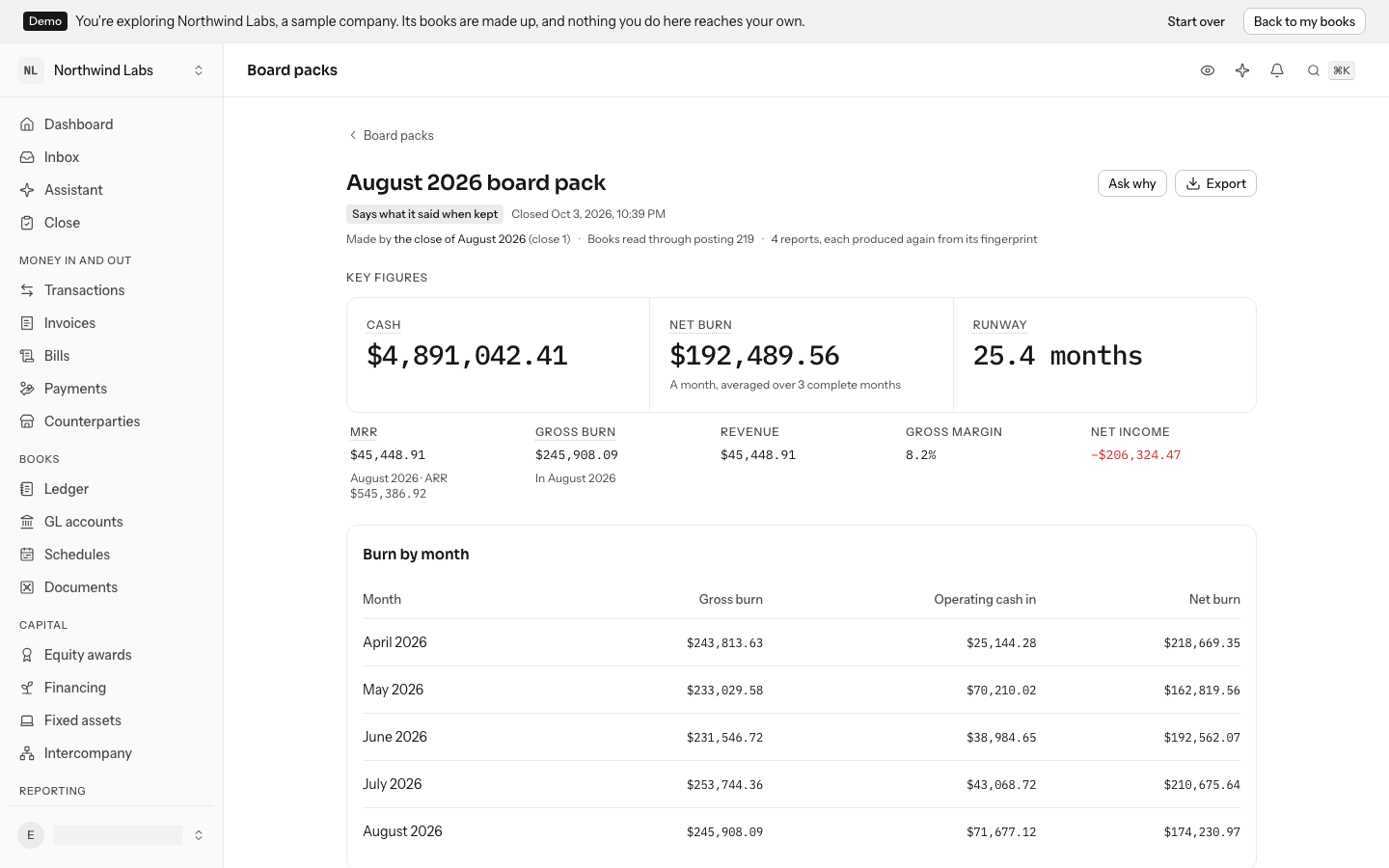
Key figures lead with cash, net burn and runway; the rest sit under them at a smaller size. They are the dashboard's figures, read the way the dashboard read them on the first day after the month ended, through the posting the close signed off:
| Figure | What it is |
|---|---|
| Cash | Every account the books treat as cash, on the month's last day. It matches the balance sheet. |
| Net burn | Operating cash out less operating cash in, averaged over up to three complete months. |
| Runway | Cash divided by net burn. Not burning when more came in than went out. |
| MRR | Subscription revenue recognized in the month, with ARR (twelve times MRR) beneath. |
| Gross burn | Operating cash that left in the month. |
| Revenue, Gross margin and Net income | From the month's income statement. |
Burn by month shows gross burn, operating cash in and net burn for up to six months ending with the pack's month. The three statements follow.
Says what it said when kept, under the pack's name, confirms that every figure is still exactly what the close kept. The same line gives the close it came from and how far the books had been posted.
Write the commentary
Under Commentary, write Highlights (what went well), Challenges (what did not, and what is being done about it) and Asks (what the company needs from its board and investors). Click a section to write in it; each holds up to 4,000 characters. Press Cmd+Enter (Ctrl+Enter on Windows) or click away to save it, and Escape to keep what was there.
The assistant can draft it. Ask it to "draft the commentary for the August board pack"; it reads the figures and statements, and proposes the three sections for you to allow, edit or deny.
Ask why a figure is what it is
Select Ask why at the top of the pack. The assistant opens with a question about the pack's cash and MRR; send it, or change it to the figure you want. It answers with the journal entries behind the figure, read as far as the close had posted, with a link to each entry, transaction and receipt.
Export it
Select Export, then PDF for the whole pack, ready to attach to an email: the figures, burn by month, your commentary and the three statements. CSV gives the key figures and burn by month for a spreadsheet.
When a month is reopened
Reopening a month leaves its pack as it was, the record of what the board was told, and marks it Month reopened since. Closing the month again makes a new pack with the new figures, starting from the commentary of the one before, so nothing you wrote is lost.
A month closed before LedgerIt made board packs has none. On its close, Make the board pack makes one from the close in force.
Developers can list, read, make, write and export board packs through the API as board_packs; see the API reference.
Do this through the API
Everything in this guide is also an API call, for scripts and agents. The reference lists each operation with its parameters and objects.